Setting up ActiveBarcode for IIS and ASP.NET & ASP
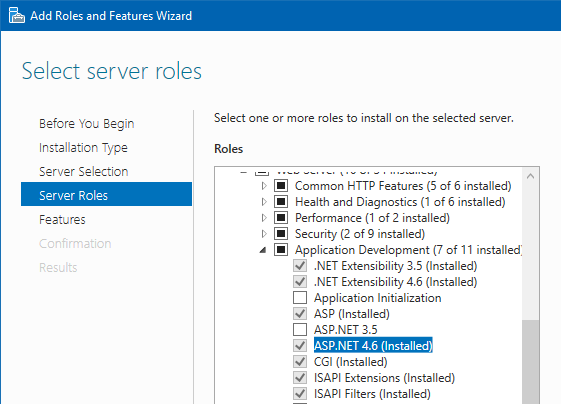
Using ActiveBarcode to display barcodes on Internet sites with IIS and ASP.NET is very simple. A standard installation of IIS and ASP.NET is usually sufficient. If you have not installed ASP.NET yet, do this first. You can install ASP by using a server role. This role is located at Web Server (IIS) -> Web Server -> Application Development -> ASP.NET [..]
Additional to IIS and ASPX you need the barcode object. If you have installed ActiveBarcode, the barcode object is already installed. The Internet-license must be installed, too. You received instructions on this with your purchase. The trial version does not require a license.
To use the ASPX demo, copy the contents of the folder c:\program files (x86)\activebarcode\aspx\ to a subfolder of the inetpub folder. E.g.: c:\inetpub\wwwroot\aspx\
Now open open the URL http://localhost/aspx/.
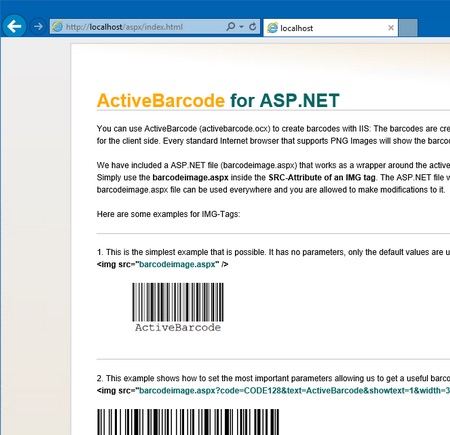
An example page will open that shows and explains how to create barcodes dynamically.
'barcodeimage.aspx' is found in c:\program files (x86)\activebarcode\aspx and must be copied to a folder that is covered by IIS. (E.g. \inetpub\wwwroot\aspx-activebarcode-demo\)
In your html pages you use 'barcodeimage.aspx' with the img tag:
Example with parameters to create the specifc barcode shown below:
Additional to IIS and ASPX you need the barcode object. If you have installed ActiveBarcode, the barcode object is already installed. The Internet-license must be installed, too. You received instructions on this with your purchase. The trial version does not require a license.
To use the ASPX demo, copy the contents of the folder c:\program files (x86)\activebarcode\aspx\ to a subfolder of the inetpub folder. E.g.: c:\inetpub\wwwroot\aspx\
Now open open the URL http://localhost/aspx/.
An example page will open that shows and explains how to create barcodes dynamically.
How to use the barcode object with ASPX
The easiest way to create barcodes dynamically is to use 'barcodeimage.aspx'. It's a wrapper for the barcode object so that you can create barcodes and use them as images in any html page using the HTML img tag.'barcodeimage.aspx' is found in c:\program files (x86)\activebarcode\aspx and must be copied to a folder that is covered by IIS. (E.g. \inetpub\wwwroot\aspx-activebarcode-demo\)
In your html pages you use 'barcodeimage.aspx' with the img tag:
<img src="barcodeimage.aspx">
A barcode with default values will be shown:

Example with parameters to create the specifc barcode shown below:
  <img src="barcodeimage.aspx?code=CODE39EXTENDED&
  text=Hello%20World!&showtext=1&rotate=90&
  backcolor=002288&forecolor=12345&width=250&
  height=430&borderwidth=50&borderheight=25">