Word 97-2003 - Barcodes in a document

Info This description is for Word 97, 2000, XP or 2003
There are also descriptions for other versions of Word available.

Embed a barcode control into a Word 97, 2000, XP or 2003 document

Flash Video

A short description of how to add a barcode to a Word document: First launch Word and create a new document or open an already existing document. Now go to the menu "Insert" and select "Object..." from that item list:

Screenshot

A dialog box appears on the screen:

Screenshot

Select "ActiveBarcode" now and click "Ok".

Alternatively you can use the function "More controls..." from the "Control Toolbox" of Word to embed the control:

Screenshot


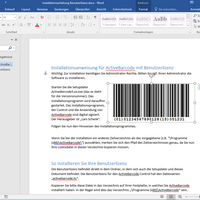
Now a barcode will be created inside your document. This will be a standard barcode of EAN-128 type. This is the default type. You can change this to any barcode type supported by ActiveBarcode: Codabar, Code 25 Industrial, Code 25 Interleaved, Code 39, Code 39 Extended, Code 93, Code 93 Extended, Code 128, Data Matrix, DUN-14, EAN-2, EAN-5, EAN-8, EAN-13, EAN-14, EAN-18, EAN-99, EAN 128, EAN-Velocity, GS1-128, GTIN, Identcode, ISBN-10, ISBN-13, ISBN-13 Dual, Bookland, ISSN, ISMN, ITF-14, JAN, Leitcode, MSI, NVE, PDF417, PostNet, PZN, Royal Mail SCC-14, SSCC-18, UCC-128, UPC-A and UPC-E

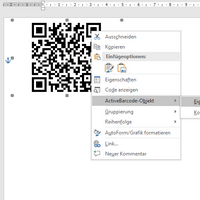
Now you can modify this barcode. You can change the type, text, colors etc. For this click inside the barcode with the right mouse button. A pop up menu will open: 

Screenshot

Select "ActiveBarcode-Object" and then "Properties...". The property dialog of ActiveBarcode will open. Here you can modify the barcode as you like.


Related video:

Video (Flash) Description Size
Icon Word:
Embed an ActiveBarcode Object into a Word document
382KB


Read more descriptions of how to add barcodes to standard applications (e.g. Office, Excel, Word, Access forms, Access reports, PowerPoint, OpenOffice.org, Lotus Notes, Publisher, Freelance, Freehand MX, Image Editors, WordPad, etc.)

rss twitter Bookmark and Share
| Home | Shop | Email | Datenschutz | Sitemap | Print preview | Version 5.57 | © Lars Schenk & Frank Horn

All trademarks and product names mentioned are the property of their respective owners.