Check digit calculation

Calculating check digits for barcodes

Modulo 10

ActiveBarcode: Info ActiveBarcode automatically calculates check digits for barcodes.
There is no need to calculate or add these check digits manually. This documentation is included for the sake of completeness only.
Calculation of a checksum according to Modulo 10:
A check digit according to Modulo 10 is used by EAN codes, e.g. EAN-13.

With the EAN codes the check digit is calculated according to the modulo 10 calculation method with the weighting 3. Weighting 3 starts at the first digit from the right. Then the individual digits are multiplied by the weighting. These results are added to a sum. The modulo 10 is calculated from this sum. First the sum is divided by 10. The remainder of the division is subtracted from 10. The result of this subtraction is the checksum/check digit.

The following is a calculation example for Modulo 10 using an EAN-13 code:

Digits: 4 0 0 7 6 3 0 0 0 0 1 1
Weight: 1 3 1 3 1 3 1 3 1 3 1 3
Results: 4+0+0+21+6+9+0+0+0+0+1+3 = 44
Calculate checksum: The addition to the next multiple of 10. (50)
Check digit 6


With the Code 25 Codes, the check digit is also calculated with weighting 3 according to the Modulo 10 calculation method. However, weighting 3 starts at the first useful digit from the left. Then the individual useful digits are multiplied by the weighting. These resulting results are added to a sum. The modulo 10 is calculated from this sum. First the sum is divided by 10. The remainder of the division is subtracted from 10 (calculate the difference to 10). The result of this subtraction is the checksum/check digit.

In the following you can see a calculation example for Modulo 10 using Code 25:

Digits: 1 2 3 4 5
Weight: 3 1 3 1 3
Results: 3+2+9+4+15 = 33
Calculate checksum: The addition to the next multiple of 10. (40)
Check digit 7


With the Leitcode and the Identcode the check digit is also calculated according to the modulo 10 calculation method. However, the weighting is different here: Weighting of 4 for odd positions and 9 for straight positions. Here is an example:

Digits: 2 3 6 6 9 0 1 2 0 1 2 3 0
Weight: 4 9 4 9 4 9 4 9 4 9 4 9 4
Results: 8+27+24+54+36+0+4+18+0+9+8+27+0 = 215
Calculate checksum: The addition to the next multiple of 10. (220)
Check digit 5


A calculation example for Modulo 10 using an EAN-14 / ITF-14 / SCC-14 / DUN-14 code:

Digits: 0 4 0 0 7 6 3 0 0 0 0 1 1
Weight: 3 1 3 1 3 1 3 1 3 1 3 1 3
Results: 0+4+0+0+21+6+9+0+0+0+0+1+3 = 44
Calculate checksum: The addition to the next multiple of 10. (50)
Check digit 6

Modulo 11

ActiveBarcode: Info ActiveBarcode automatically calculates check digits for barcodes.
There is no need to calculate or add these check digits manually. This documentation is included for the sake of completeness only.
Calculation of a checksum according to Modulo 11:
A check digit according to Modulo 11 is used e.g. by PZN. A Modulo 11 is also used for ISBN.

PZN
First all digits are multiplied individually with a multiplier. The multiplier corresponds to the position of the digit + 1. All resulting products are added. The result is then divided by 11. The resulting remainder is the check digit. If the check digit is 10, this number shall not be used as PZN. The code would therefore be invalid.

A calculation example:

Digits: 6 3 1 9 4 2
Weight: 2 3 4 5 6 7
Results: 12+9+4+45+24+14 = 108
Calculate checksum: 108 / 11 = 9 Remainder 9
Check digit 9


The ISBN-10 and the ISSN checksum
First all digits are multiplied individually with a multiplier. The multiplier corresponds to the position of the digit + 1 from the right. All resulting products are added. The result is then divided by 11. The resulting remainder is subtracted from 11 and results in the check digit.
If result 11 is calculated for this checksum procedure, the checksum is 0. As result the 0 could not be calculated, because in the previous step (remainder with division by 11) 11 is impossible as a result.
It may also happen that the digit 10 is required. 10 is represented by an X: "3-928444-00-X".

A calculation example:

Digits: 3 9 2 8 4 4 4 0 4
Weight: 10 9 8 7 6 5 4 3 2
Results: 30 + 81 + 16 + 56 + 24 + 20 + 16 + 0 + 8 = 251
Calculate checksum: 251 / 11 = 22 Remainder 9 -> 11 - 9 = 2
Check digit 2

Modulo 16

ActiveBarcode: Info ActiveBarcode automatically calculates check digits for barcodes.
There is no need to calculate or add these check digits manually. This documentation is included for the sake of completeness only.
Calculation of a checksum according to Modulo 16:
Modulo 16 is used by the barcode symbology Codabar. Here is an example of how to calculate the check digit according to Modulo 16:

Digits: A 7 8 9 A
Reference numbers: 16 7 8 9 16
Sum of reference numbers: 56
Calculate checksum: 56 / 16 = 3 Remainder 8
difference: 16 - 8 = 8
Check digit Reference number 8 = 8

Reference numbers:
00 = 0
01 = 1
02 = 2
03 = 3
04 = 4
05 = 5
06 = 6
07 = 7
08 = 8
09 = 9
10 = -
11 = $
12 = :
13 = /
14 = .
15 = +
16 = A
17 = B
18 = C
19 = D

Modulo 43

ActiveBarcode: Info ActiveBarcode automatically calculates check digits for barcodes.
There is no need to calculate or add these check digits manually. This documentation is included for the sake of completeness only.
Calculation of a checksum according to Modulo 43:
A check digit according to Modulo 43 is used e.g. by the Code 39.

First, reference numbers are assigned to all characters of the code. These reference numbers are added to a total. This sum is divided by 43. The rest of this division corresponds to the checksum, which is then replaced by the character corresponding to the reference number is represented.

A calculation example:

Digits: 1 5 9 A Z
Reference numbers: 1 +5 +9 +10 +35
Sum of reference numbers: 60
Calculate checksum: 60 / 43 = 1 Remainder 17
Check digit "H" (Reference number 17)

Reference numbers:
00 0
01 1
02 2
03 3
04 4
05 5
06 6
07 7
08 8
09 9
10 A
11 B
12 C
13 D
14 E
15 F
16 G
17 H
18 I
19 J
20 K
21 L
22 M
23 N
24 O
25 P
26 Q
27 R
28 S
29 T
30 U
31 V
32 W
33 X
34 Y
35 Z
36 -
37 .
38 Space
39 $
40 /
41 +
42 %


Code example for calculating the checksum according to Modulo 43

Excel VBA Code for calculating the checksum according to Modulo 43, e.g. for the HIBC code:
' calc modulo 43
‘ returns the input string plus the check character
' demo for www.activebarcode.com
Public Function MOD43CheckChar(sValue As String) As String
    Const charSet As String = "0123456789ABCDEFGHIJKLMNOPQRSTUVWXYZ-. $/+%"
    Dim i As Integer
    Dim T As Long
    For i = 1 To Len(Trim(UCase(sValue)))
        T = InStr(charSet, Mid(sValue, i, 1)) - 1 + T
    Next i
    MOD43CheckChar = sValue & Mid$(charSet, (T Mod 43 + 1), 1)
End Function

Modulo 47

ActiveBarcode: Info ActiveBarcode automatically calculates check digits for barcodes.
There is no need to calculate or add these check digits manually. This documentation is included for the sake of completeness only.
Calculation of a checksum according to Modulo 47:
A check character according to Modulo 47 is used e.g. by the Code 93.

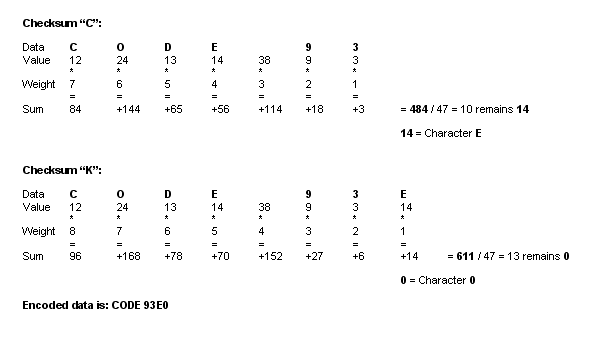
Code 93 uses 2 checksums, the so-called C checksum and the so-called K checksum. Both are calculated according to the same principle. However, the K checksum also contains the C checksum.

During the calculation, reference numbers are first assigned to all characters of the code. Each digit in the code is assigned a weighting and was incremental from behind. Accordingly, the last position has the weight 1, the penultimate position the weight 2, and so on. The reference numbers are multiplied in each case by the weighting. The resulting individual results are added together.

This total is now divided by 47. The remainder of this division corresponds to the checksum, which is coded as a character using the reference number.

The K checksum is determined in the same way. However, this time the character string of the code - as with the first checksum - plus the C checksum is used as the basis. The first determined checksum is included in the calculation of the second checksum.

A calculation example:

Checksum with Modulo47

Reference numbers Code 93:

00 0
01 1
02 2
03 3
04 4
05 5
06 6
07 7
08 8
09 9
10 A
11 B
12 C
13 D
14 E
15 F
16 G
17 H
18 I
19 J
20 K
21 L
22 M
23 N
24 O
25 P
26 Q
27 R
28 S
29 T
30 U
31 V
32 W
33 X
34 Y
35 Z
36 -
37 .
38 Space
39 $
40 /
41 +
42 %
43 ($)
44 (%)
45 (/)
46 (+)
- * Start/Stop