ملفات الصور النقطية
تحكم دقيق في البكسل وتوافق واسع النطاق

 Standard أو أعلى

صور نقطية للباركود

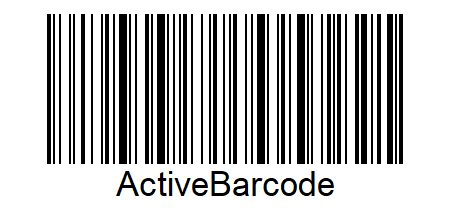
يمكنك استخدام ActiveBarcode لحفظ الباركود كصورة نقطية. تتيح هذه التنسيقات الرسومية العمل بدقة البكسل. يمكنك إنشاء ملفات صور بطرق مختلفة.
  • يمكنك حفظ الصور النقطية باستخدام ActiveBarcode Generator كملف.
    للقيام بذلك، استخدم وظيفة تصدير من قائمة ملف واختر تنسيق الصورة النقطية عند الحفظ.
  • يمكنك نسخ صورة نقطية إلى الحافظة باستخدام القائمة نسخ صورة نقطية من ActiveBarcode Generator.
  • يمكنك حفظ الصور النقطية كملف باستخدام طرق ActiveBarcode Control:
    SaveAs,
    SaveAsBySize أو
    SaveAsBySizeExtended.
  • يمكنك حفظ الصور النقطية في وحدة التحكم (سطر الأوامر) باستخدام أداة ActiveBarcodeCLI.
  • باستخدام ActiveBarcode REST API، يمكن إنشاء صور الباركود دون تثبيت أي برامج.
تنسيقات ملفات الصور المدعومة

يتم دعم تنسيقات ملفات الصور الشائعة التالية:

ActiveBarcode: Windows Bitmap
Windows Bitmap
Extension: BMP
Format #: 0
1-bit s/w: ActiveBarcode: yes
8-bit: ActiveBarcode: yes
16-bit: ActiveBarcode: yes
24-bit: ActiveBarcode: yes
32-bit: ActiveBarcode: default default
ActiveBarcode: JPEG
JPEG
Extension: JPG, JPEG
Format #: 2
1-bit s/w: ActiveBarcode: no
8-bit: gray
16-bit: ActiveBarcode: no
24-bit: ActiveBarcode: default default
32-bit: ActiveBarcode: no
ActiveBarcode: Portable Network Graphic
Portable Network Graphic
Extension: PNG
Format #: 13
1-bit s/w: ActiveBarcode: yes
8-bit: ActiveBarcode: yes
16-bit: ActiveBarcode: no
24-bit: ActiveBarcode: default default
32-bit: ActiveBarcode: yes
ActiveBarcode: TIFF
TIFF
Extension: TIF
Format #: 18
1-bit s/w: ActiveBarcode: yes
8-bit: ActiveBarcode: yes
16-bit: ActiveBarcode: no
24-bit: ActiveBarcode: default default
32-bit: ActiveBarcode: yes
ActiveBarcode: Targa
Targa
Extension: TGA
Format #: 17
1-bit s/w: ActiveBarcode: no
8-bit: ActiveBarcode: yes
16-bit: ActiveBarcode: yes
24-bit: ActiveBarcode: default default
32-bit: ActiveBarcode: yes
ActiveBarcode: GIF
GIF
Extension: GIF
Format #: 25
1-bit s/w: ActiveBarcode: yes
8-bit: ActiveBarcode: default default
16-bit: ActiveBarcode: no
24-bit: ActiveBarcode: no
32-bit: ActiveBarcode: no
ActiveBarcode: Windows Metafile Format
Windows Metafile Format
Extension: WMF
Format #: 101
1-bit s/w: ActiveBarcode: no
8-bit: ActiveBarcode: no
16-bit: ActiveBarcode: no
24-bit: ActiveBarcode: default default
32-bit: ActiveBarcode: no
ActiveBarcode: Enhanced Metafile Format
Enhanced Metafile Format
Extension: EMF
Format #: 100
1-bit s/w: ActiveBarcode: no
8-bit: ActiveBarcode: no
16-bit: ActiveBarcode: no
24-bit: ActiveBarcode: default default
32-bit: ActiveBarcode: no
ActiveBarcode: Wireless Bitmap
Wireless Bitmap
Extension: WBM, WBMP
Format #: 19
1-bit s/w: ActiveBarcode: default default
8-bit: ActiveBarcode: no
16-bit: ActiveBarcode: no
24-bit: ActiveBarcode: no
32-bit: ActiveBarcode: no
ActiveBarcode: Portable Bit Map
Portable Bit Map
Extension: PBM
Format #: 7
1-bit s/w: ActiveBarcode: default default
8-bit: ActiveBarcode: no
16-bit: ActiveBarcode: no
24-bit: ActiveBarcode: no
32-bit: ActiveBarcode: no
ActiveBarcode: Portable Gray Map
Portable Gray Map
Extension: PGM
Format #: 11
1-bit s/w: ActiveBarcode: no
8-bit: gray/default
16-bit: ActiveBarcode: no
24-bit: ActiveBarcode: no
32-bit: ActiveBarcode: no
ActiveBarcode: Portable Pixel Map
Portable Pixel Map
Extension: PPM
Format #: 14
1-bit s/w: ActiveBarcode: no
8-bit: ActiveBarcode: no
16-bit: ActiveBarcode: no
24-bit: ActiveBarcode: default default
32-bit: ActiveBarcode: no
ActiveBarcode: X Pix Map
X Pix Map
Extension: XPM
Format #: 23
1-bit s/w: ActiveBarcode: no
8-bit: ActiveBarcode: no
16-bit: ActiveBarcode: no
24-bit: ActiveBarcode: default default
32-bit: ActiveBarcode: no
تكون أعماق الألوان المحددة كافتراضية نشطة عند استخدام وظيفة SaveAs أو SaveAsBySize أو عند تعيين عمق اللون على صفر عند استخدام وظيفة SaveAsBySizeExtended.

تنزيل ملف صورة نقطية نموذجي
PNG