Property dialog
General
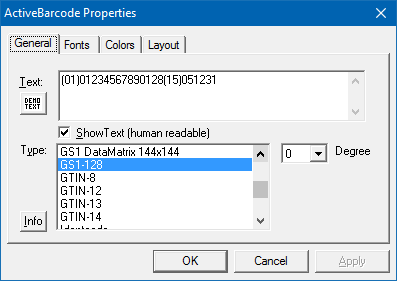 The General page of the property dialog sets the following properties:
 Text:
Here you enter the text to be encoded in the barcode.
Demo Text:
If you push this button, a valid demo text for the current selected barcode type will be generated automatically.
Show Text:
If you swith this checkbox on, the human readable line will be created. If it's off, the human readable line will not be shown in the barcode control.
Type:
Here you can select the barcode type. ActiveBarcode currently supports many different barcodes types, like QR Code, GS1/EAN-128, Data Matrix, GTIN/EAN-13, Code 39, Code 93, GS1-Data Matrix, Code 128, PDF417, DUN-14, EAN-8, EAN-14, EAN-18, ISBN, ITF-14, NVE, PZN8, SCC-14, SSCC-18, ...
Rotate:
You set the orientation/rotation of the barcode in degreess (0, 90, 180, 270).
Fonts
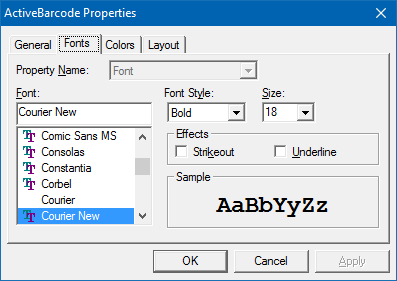 The Fonts page of the property dialog sets the following properties:
 Font:
Select the font for the human readable line. You should prefer to use TrueType fonts to avoid problems when rotating the barcode.
Font Style:
Select attributes for your font e.g. bold, italic, ..
Size:
Select the size of the font.
Effects:
You can use additional effects for the font here.
Colors
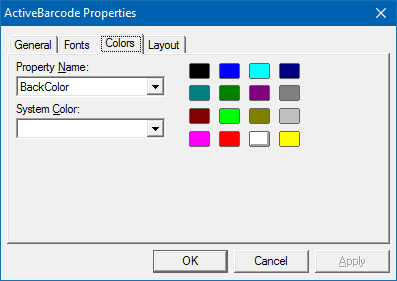 The Colors page of the property dialog sets the following properties:
 Property Name:
Select BackColor or ForeColor to choose what you want to edit.
System color:
Not used.
Layout
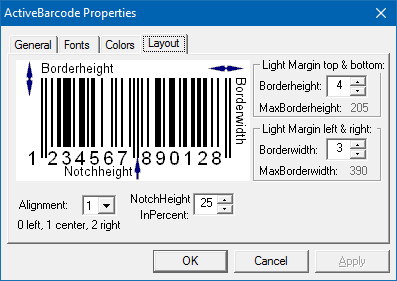 The Layout page of the property dialog sets the following properties:
 Alignment:
Alignment sets the alignment of the barcode inside the control.
Borderheight:
BorderHeight sets the height of the border above and under the barcode in pixels.
Borderwidth:
BorderWidth sets the width of the border on the left and the right of the barcode in pixels.
The border is painted in the current background color.
NotchHeightInPercent:
Sets the length of the notches in percent.